Mobile Dead Man's Switch (GrapheneReset)
Introduction
To operate in environments where device seizure is a credible threat requires layered defenses. GrapheneOS's Duress PIN handles forced-unlock scenarios admirably—enter the wrong PIN and your device wipes immediately. But this assumes you'll have the opportunity to interact with your device during capture.
In this article we examine a different threat vector: extended detention where your phone remains powered and accessible to forensic tools for days or weeks without your intervention. We'll present GrapheneReset, a time-based dead man's switch that complements existing deniability mechanisms and server-side dead man's switches to provide defense in depth when human action becomes physically impossible.
Threat Model: Extended Detention Scenarios
Situation
You are arrested. Your phone is seized. You are held in detention for an indeterminate period—days, weeks, potentially months—without access to your device. The device will return to a Before-First-Unlock state (thanks to Graphene's auto reboot feature), offering a first layer of security but the data will still be there to be extracted or decrypted if you are pressured in doing so.
Assets
Your mobile device contains: - Encrypted communications history - Contact information for associates - Access credentials to sensitive services - Location history and metadata - Potentially incriminating evidence
Adversary Capabilities
Adversaries with physical possession of your device have several attack vectors:
Forensic extraction tools: Cellebrite UFED, GrayKey, and similar commercial platforms can attempt: - Brute-force attacks against weak PINs (given sufficient time) - Exploitation of zero-day vulnerabilities in the mobile OS - Physical chip-off attacks to extract raw NAND flash contents - Side-channel attacks against encryption implementations
Time as a weapon: Extended physical access provides: - Multiple attempts at different attack methodologies - Opportunity to wait for vendor vulnerabilities to be disclosed
Legal compulsion: Depending on jurisdiction: - Court orders may eventually compel device unlock - Contempt charges for refusing to provide credentials - Increasing pressure over time through isolation and detention
Attack Timeline
Day 0 (Seizure): Device is powered on and seized. Immediate forensic imaging begins.
Days 1-3: Standard extraction attempts using commercial tools. Known exploits tested against your OS version.
Days 4-7: Escalation to specialized forensic labs. Custom toolchains deployed. Brute-force attacks against PIN space initiated if device remains accessible.
Week 2+: Legal proceedings begin. Pressure increases to provide unlock credentials. Forensic teams have had sufficient time to attempt multiple attack vectors.
The time dimension is the attack surface. A phone seized Monday that remains intact Friday gives adversaries a 5-day window. This is where time-based automatic wiping becomes not just useful, but essential.
Tools of the Trade
GrapheneReset: Time-Based Device Wipe
GrapheneReset is a dead man's switch implementation for mobile devices. Forked from Oblivion, it provides enhanced customization specifically for GrapheneOS users who require precise control over their security parameters.
Core mechanism: The application maintains a countdown timer that resets each time you unlock your device. If the timer expires without device unlock, GrapheneReset invokes Android's Device Administrator API to trigger a factory reset, permanently erasing all device data including encryption keys.
Upstream differences: While Oblivion offers five preset intervals (7, 14, 30, 60, 90 days), GrapheneReset implements fully customizable timers from 1 to 365 days. This allows threat-model-specific timer configuration based on your operational security requirements.
Architectural Comparison: Layered Deniability
Different scenarios require different defensive mechanisms. Here's how mobile deniability tools complement each other:
| Mechanism | Duress PIN | GrapheneReset | Server Dead Man's Switch |
|---|---|---|---|
| Trigger mechanism | Manual input required | Automatic timer-based | Automatic checkin-based |
| Scope of protection | Device wipe | Device wipe | Infrastructure inheritance |
| User action required | Yes (enter specific PIN) | No (absence = trigger) | No (absence = trigger) |
| Optimal scenario | Forced unlock at gunpoint | Extended seizure | Operator arrest/disappearance |
| Protection window | Immediate (seconds) | Days to weeks | Weeks to months |
| Implementation platform | GrapheneOS built-in | GrapheneOS/Android app | Remote server |
| Countermeasure | Physical coercion before unlock attempt | Device powered off | Bot server compromised |
Trigger Mechanisms
GrapheneReset provides multiple activation pathways:
Passive triggers (automatic): - Primary countdown timer - Core mechanism, resets on device unlock - Lock screen notification - Persistent countdown display - Notification listener service - Monitors system events for unlock activity
Active triggers (manual): - Quick Settings tile - One-tap emergency wipe from notification shade - Home screen shortcut - Direct activation without entering the app - Panic Kit integration - Compatible with Panic Kit broadcast system
Permission Model
GrapheneReset requires Android Device Administrator privileges to execute factory resets. This is the same permission level used by enterprise Mobile Device Management (MDM) solutions and is the minimum required for secure wipe capabilities.
Security consideration: Device Admin apps can be disabled through Settings, so physical access before lock could allow an adversary to disable GrapheneReset. This is why the timer duration must account for the time between seizure and your inability to access the device.
Implementation
Prerequisites
Before deployment, ensure you have:
- GrapheneOS device - See How to install GrapheneOS for installation instructions
- GrapheneReset APK - Available from to build from source using the provided Nix flake
Installation Process
Step 1: Download the APK
Navigate to the binaries directory and download the latest APK. Your browser will prompt to save the file.
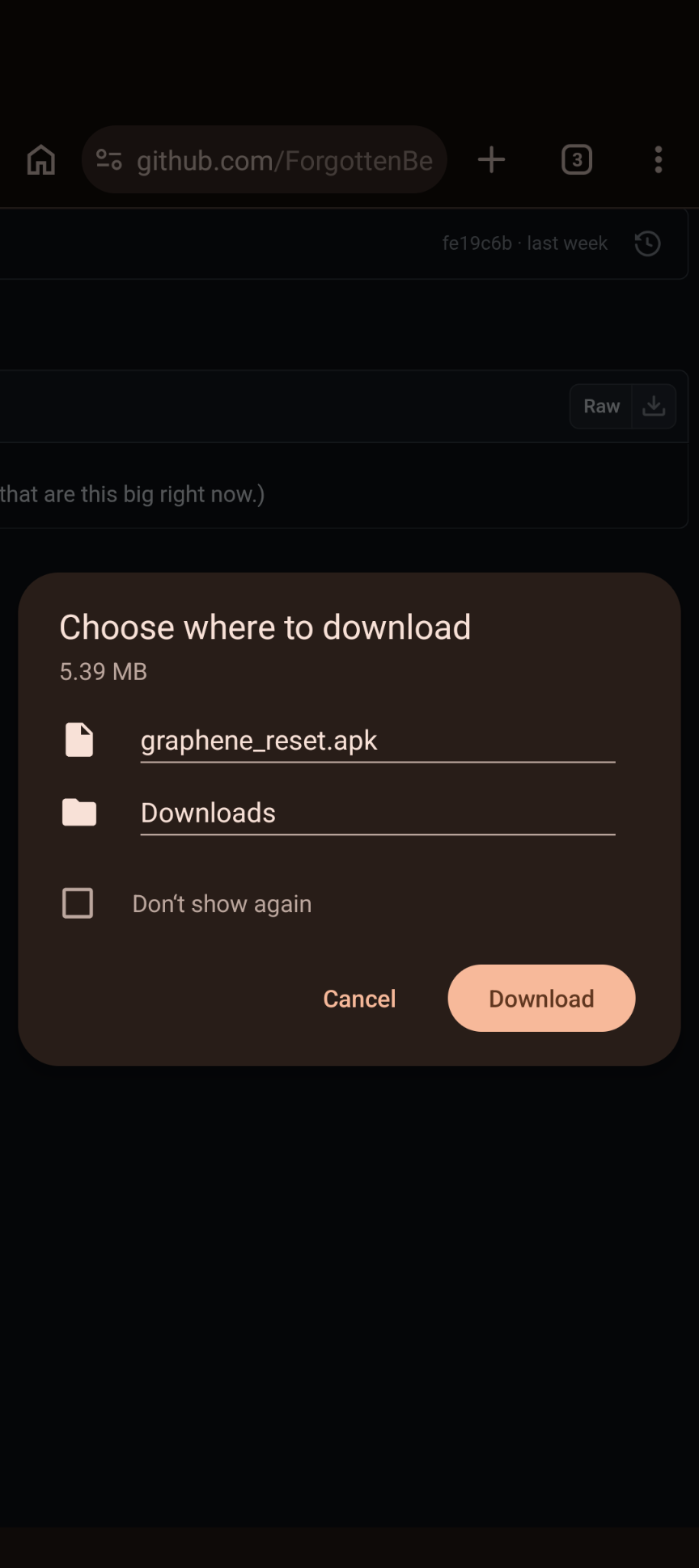
Confirm the download and wait for completion.

Once downloaded, the APK will appear in your Downloads folder.

Step 2: Install via Package Manager
Navigate to your Downloads folder and tap the APK file. GrapheneOS will display installation permissions.
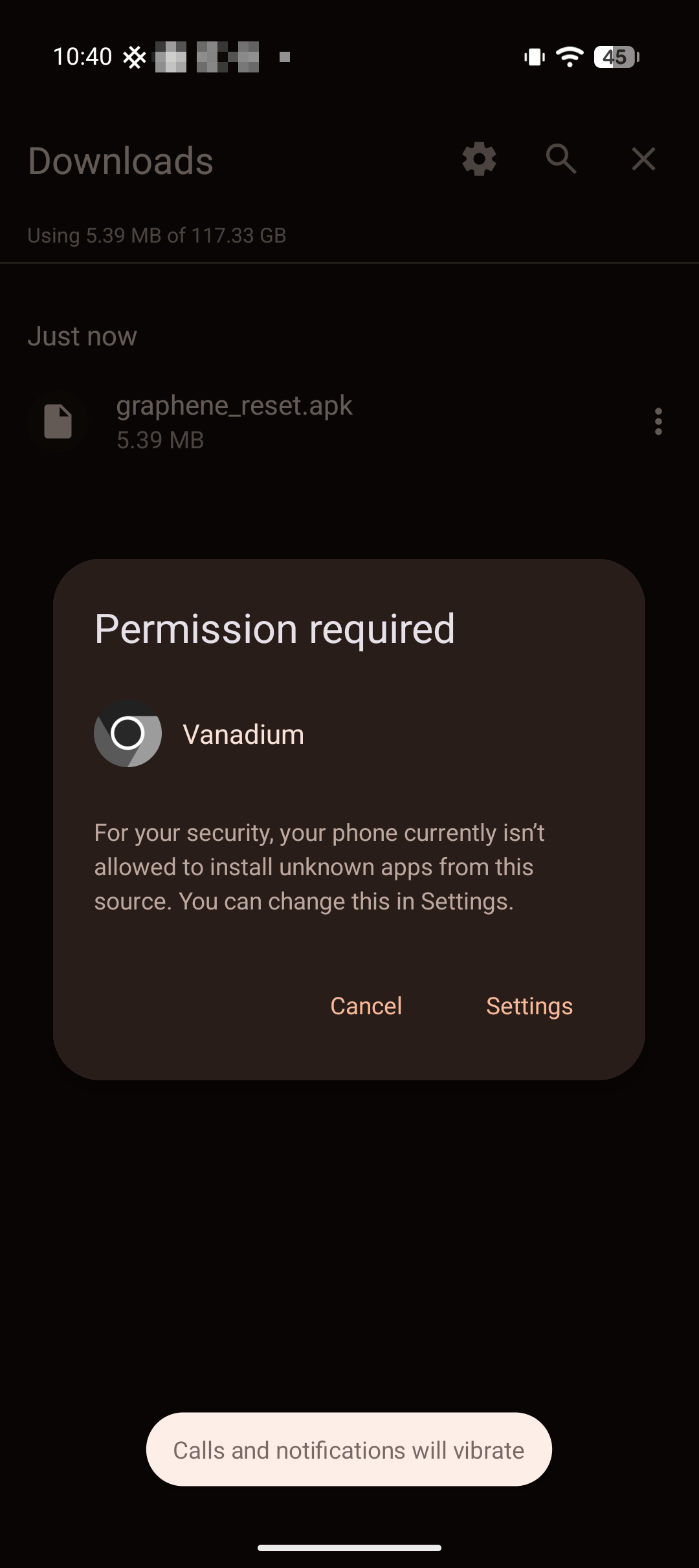
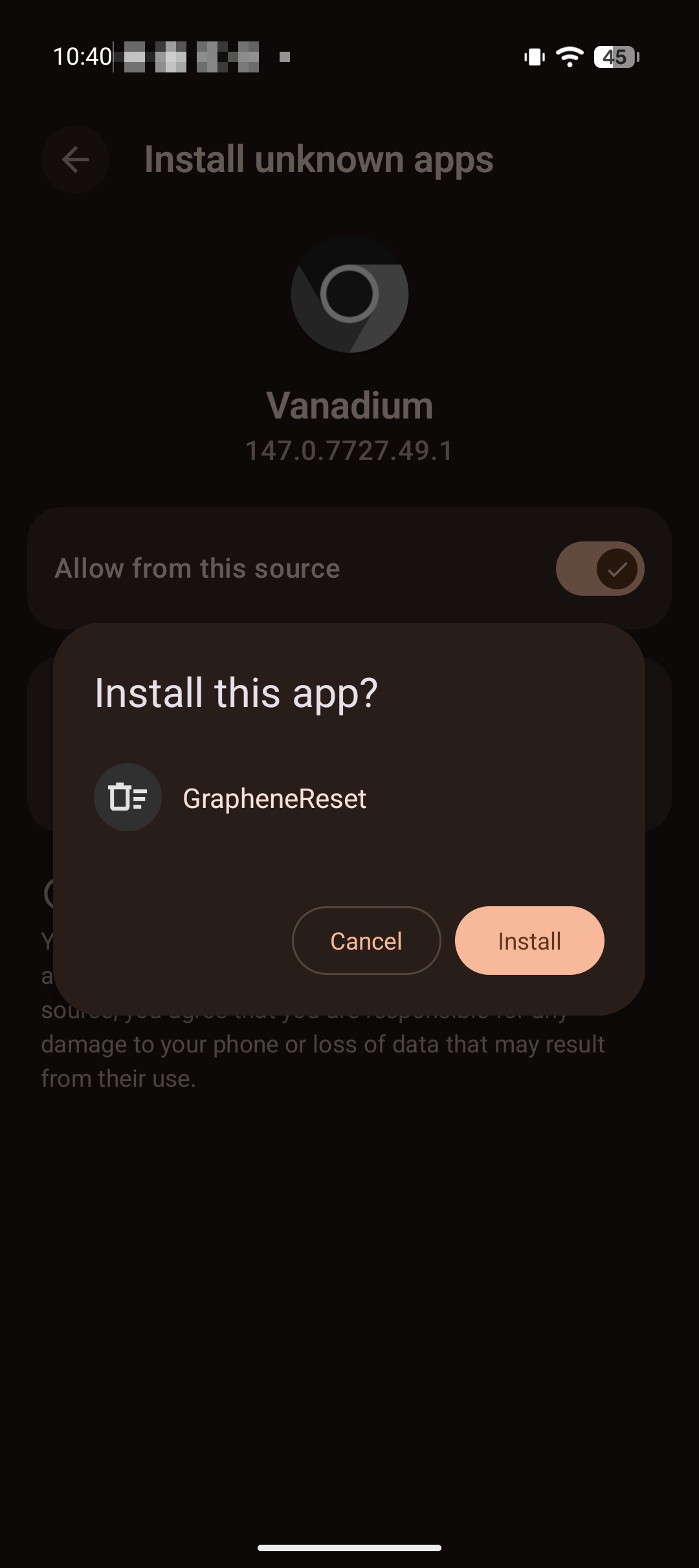
Review the requested permissions. GrapheneReset requires:
- Install packages
- Access to storage for APK file reading
Tap "Install" to proceed.
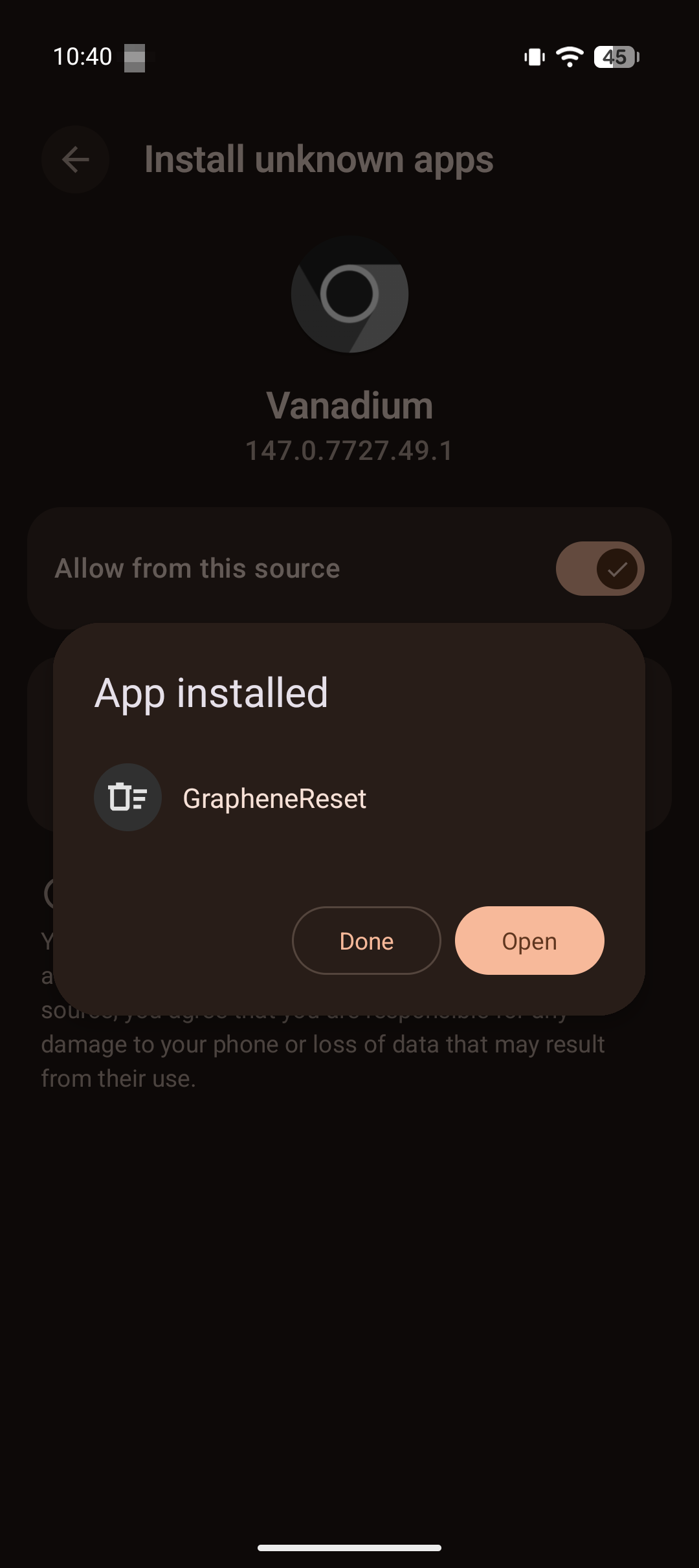
Wait for installation to complete. The system will verify the APK signature and extract application components.
Step 3: Grant Device Administrator Permissions
Launch GrapheneReset. On first run, the application will request Device Administrator privileges.
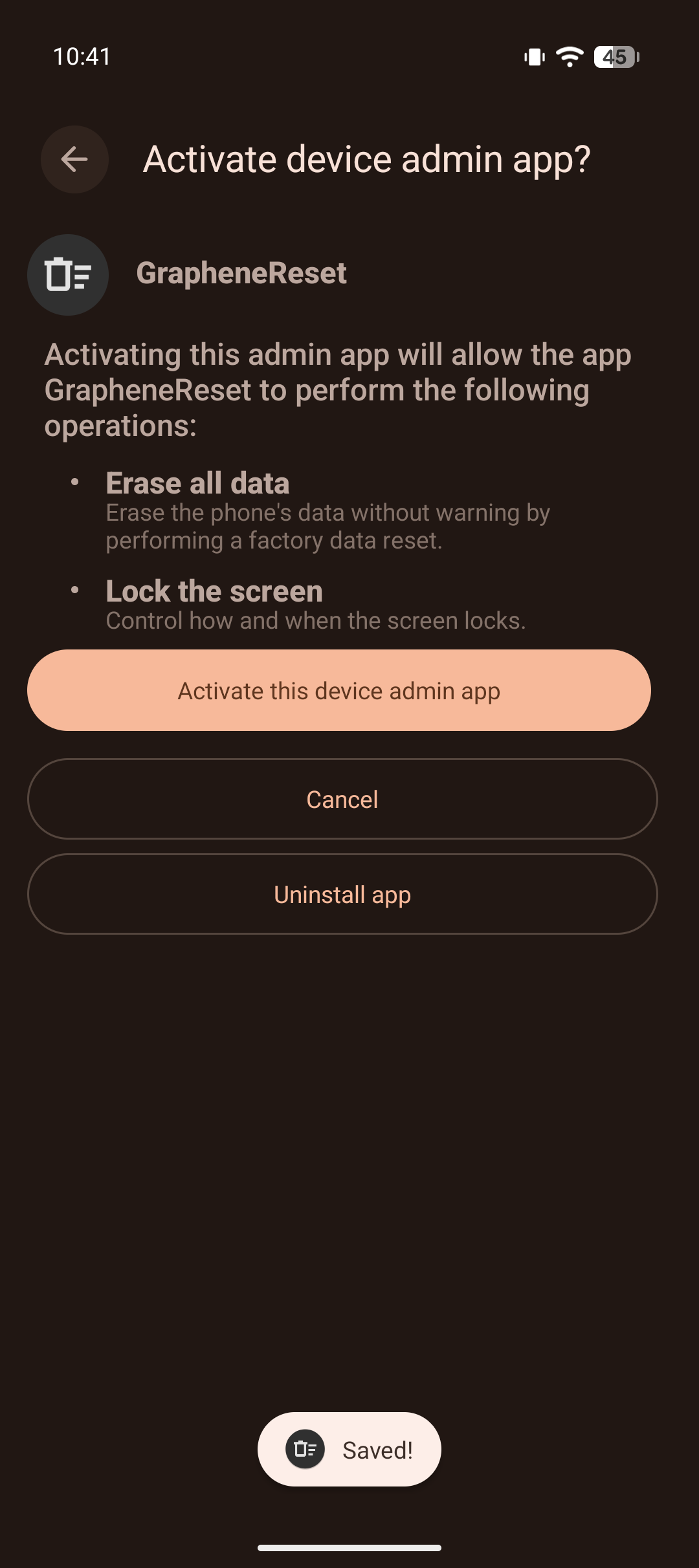
This permission level is required to execute factory resets. Review the capabilities:
- Wipe data (factory reset)
- Lock device
- Monitor unlock events
Tap "Activate this device admin app" to grant permissions. Without Device Admin privileges, GrapheneReset cannot trigger factory resets.
Step 4: Enable Notification Listener Service
GrapheneReset requires notification access to monitor device unlock events and maintain the countdown timer.
Navigate to: Settings → Apps → Special app access → Notification access
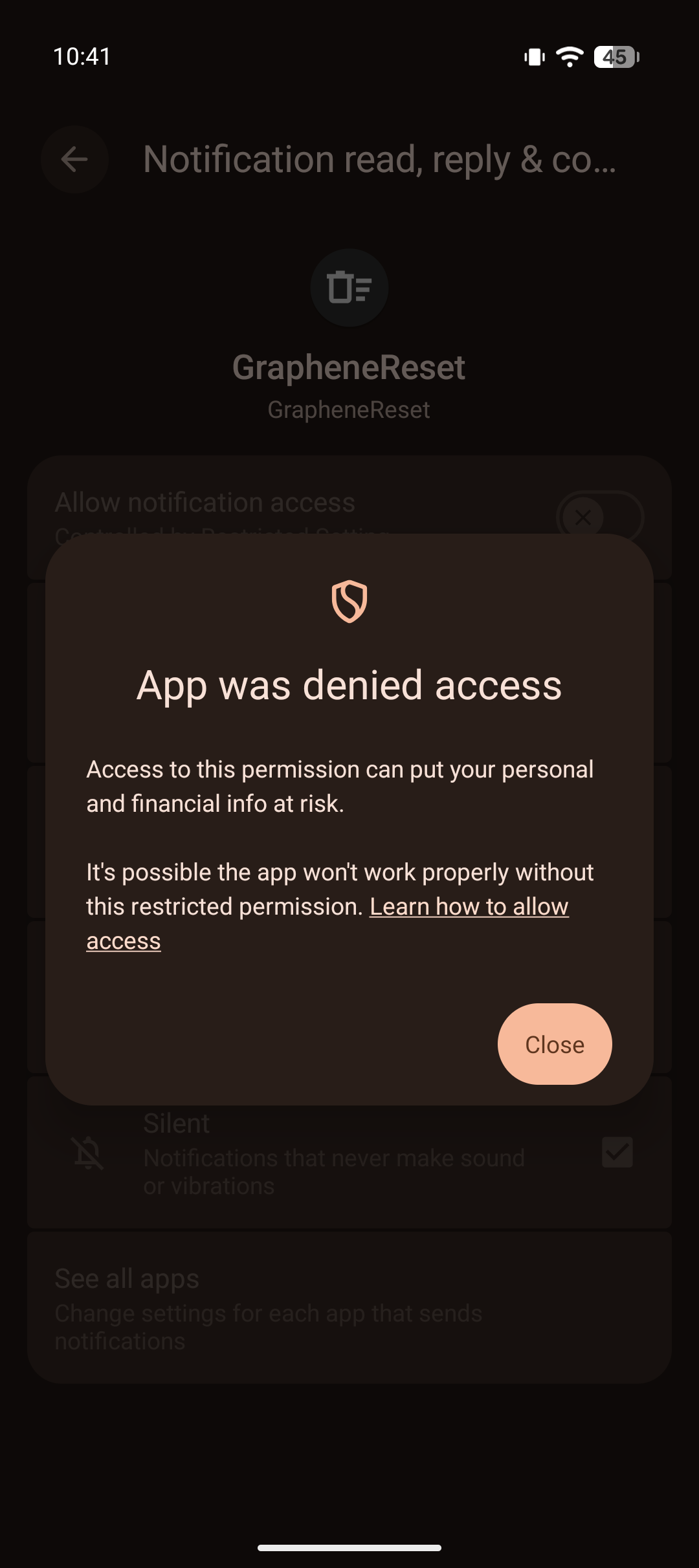
Locate GrapheneReset in the list of installed applications.
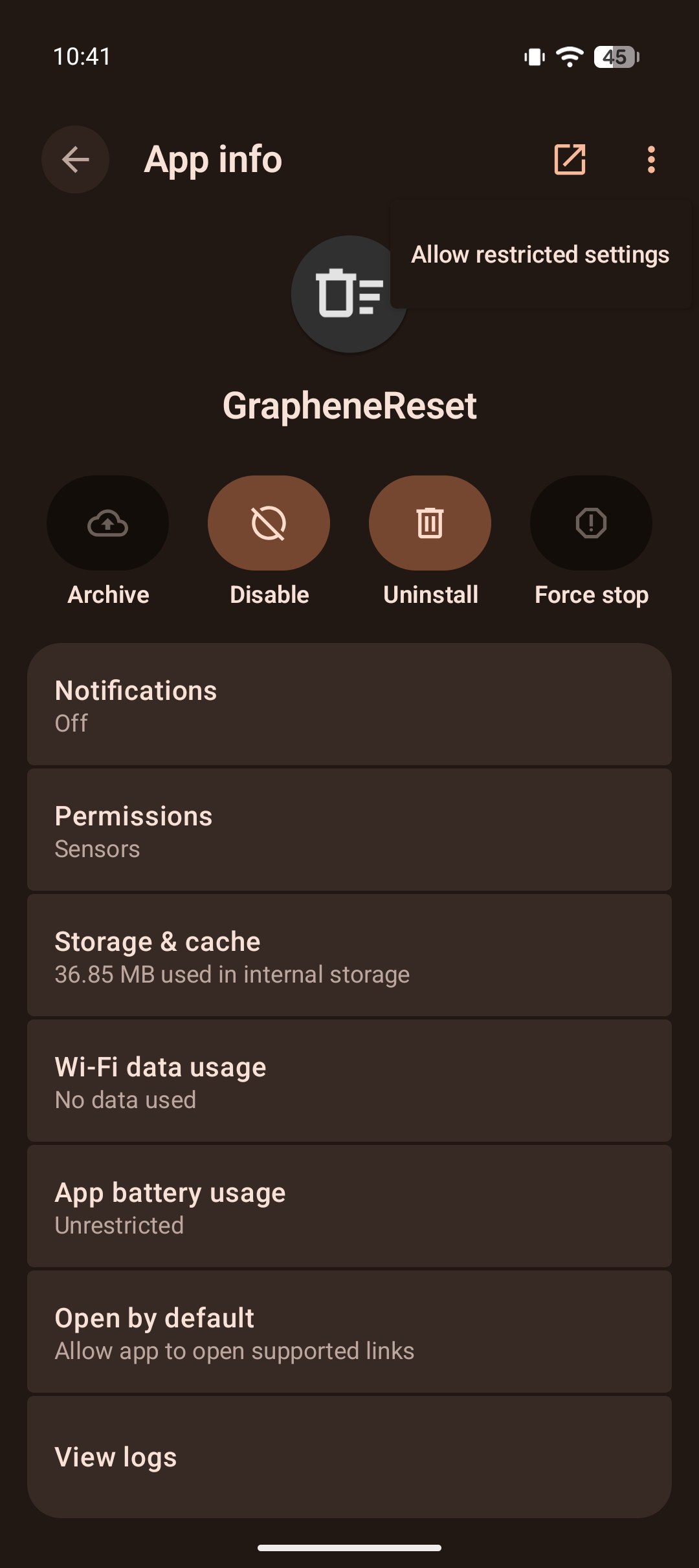
Tap GrapheneReset and toggle "Allow notification access" to enabled.
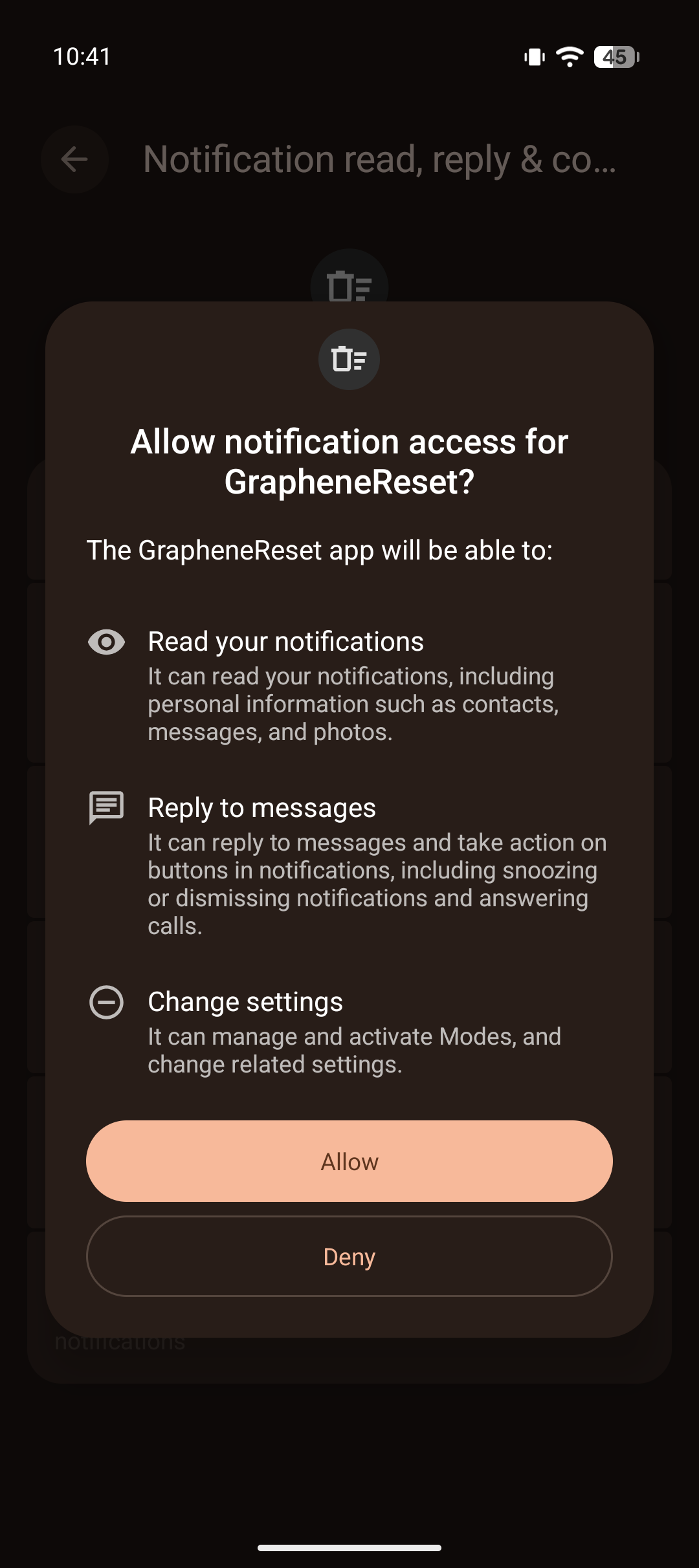
The system will display a warning about granting notification access. Tap "Allow" to confirm.
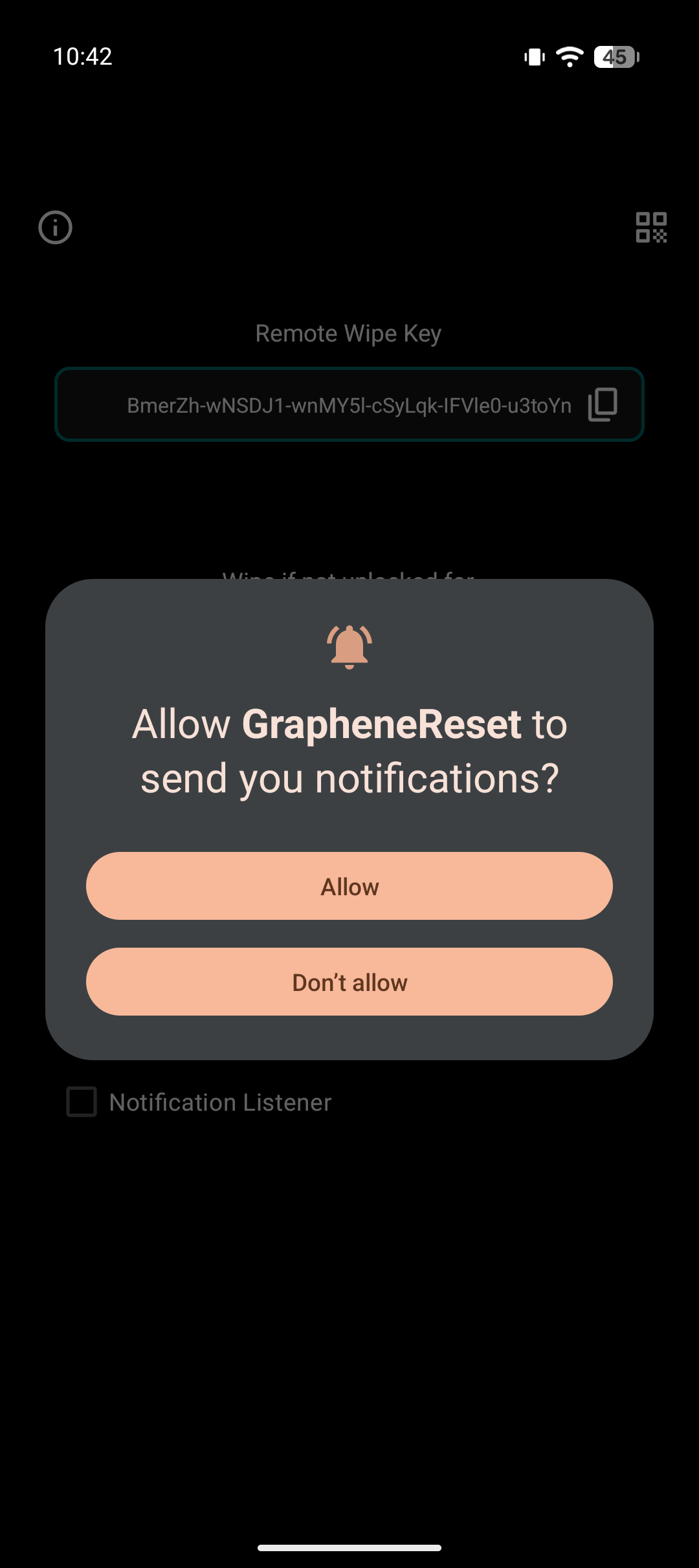
GrapheneReset can now monitor unlock events and reset the countdown timer appropriately.
Configuration
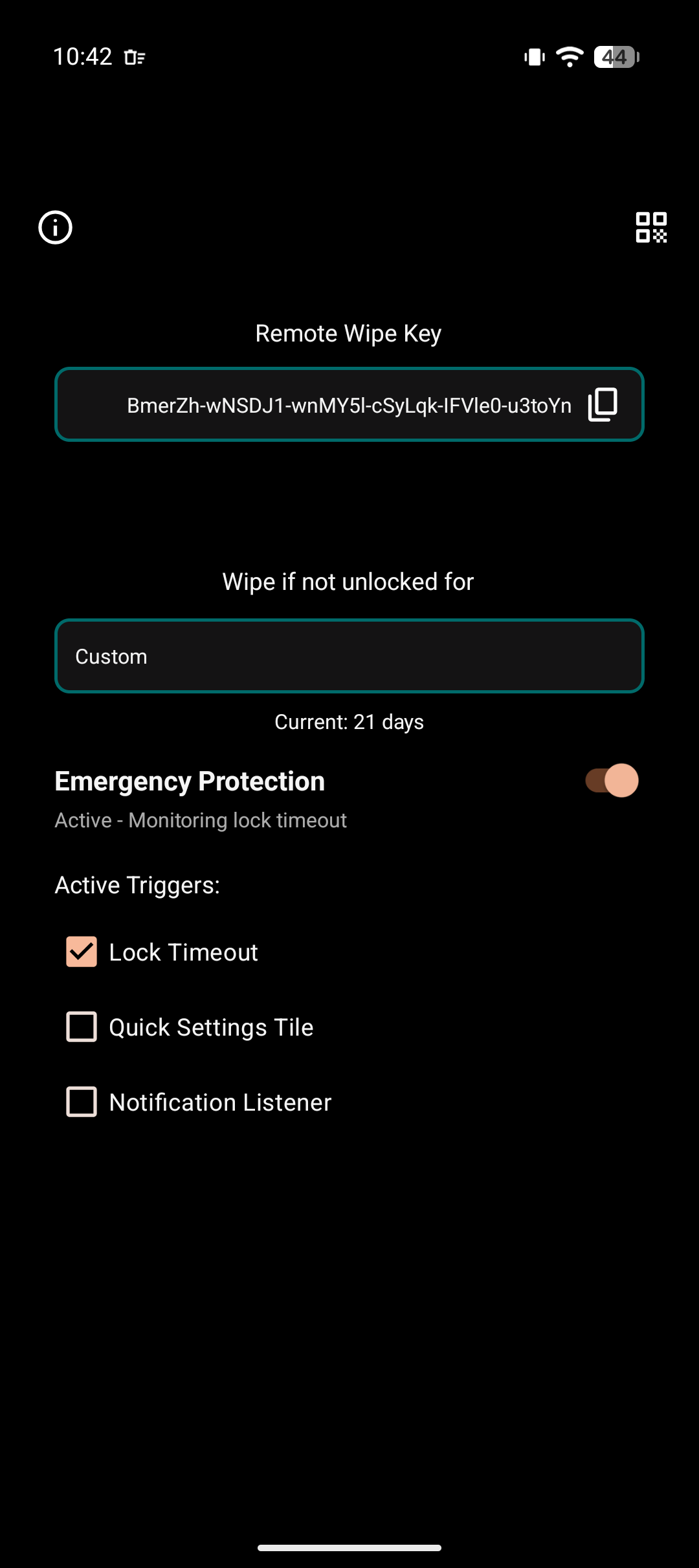
Step 5: Timer Configuration
Launch GrapheneReset and configure your wipe timer. Timer selection is threat-model dependent:
Conservative approach (7-14 days): - Suitable for high-risk operations - Minimizes forensic analysis window - Requires regular device access
Balanced approach (30-60 days): - Reasonable for moderate threat models - Accounts for travel, device issues, hospitalization - Still protects against extended detention
Permissive approach (90+ days): - Lower risk of accidental wipe - Larger forensic window if seized - Better for devices used sporadically
Step 6: Trigger Method Configuration
Enable desired trigger mechanisms:
- Quick Settings tile - For emergency manual wipe
- USB monitoring - Wipe on forensic device connection
- Panic Kit integration - Coordinate with other security apps
Verification
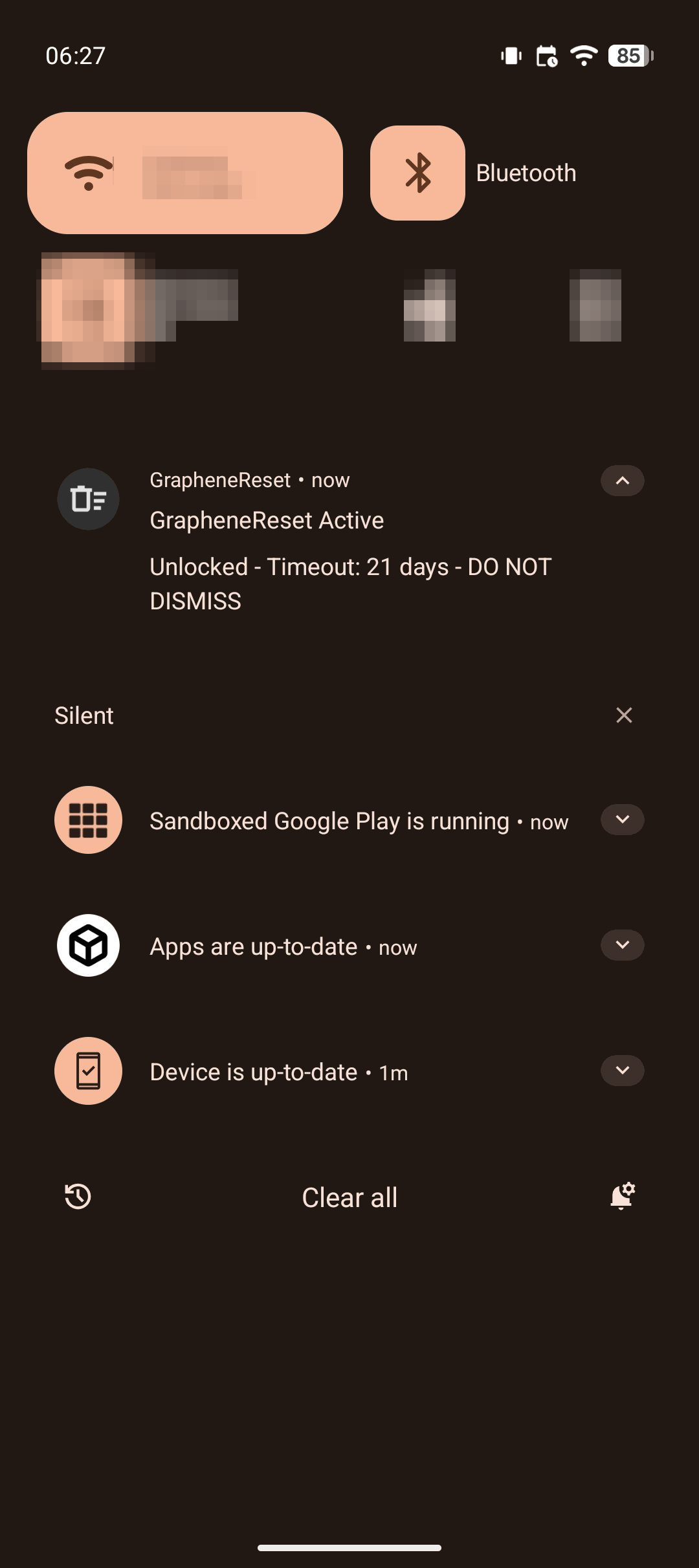
Step 7: Confirm Active Status
Verify the timer is running correctly:
- Lock screen displays countdown
- Notification persists showing time remaining
- Unlocking device resets the countdown
Step 8: Test on Expendable Hardware
CRITICAL VERIFICATION STEP:
Before deploying GrapheneReset on your primary device, test the complete wipe cycle on an expendable device:
- Install GrapheneReset on a test device with non-critical data
- Set timer to 2 minute (minimum safe test duration)
- Do NOT unlock the device for 2+ minutes
- Verify factory reset triggers automatically
- Confirm all data is irrecoverably wiped
- Test recovery process to ensure device is truly reset
Do not skip this step. A failed wipe during actual detention is worse than no wipe capability at all, as it provides false security assumptions.
Operational Considerations
Known Limitations
Power-off vulnerability:
If adversaries power off your device immediately upon seizure, the countdown timer continues. GrapheneReset will wipe on boot if rebooted after the timer, before you even have the opportunity to enter a PIN.
Keep in mind that many seizure protocols mandate keeping devices powered to: - Preserve volatile memory contents - Maintain active network connections for monitoring - Keep encrypted volumes mounted for immediate forensic imaging - Prevent triggering any power-loss wipe mechanisms
Threat-Model Based Timer Selection
Timer duration is a critical security parameter. Consider the following factors:
Operational tempo: - How frequently do you normally unlock your device? - What's your longest expected period without access (travel, medical emergency)? - Add 2-3 days buffer for unexpected but legitimate scenarios
Adversary capabilities: - State-level actors with specialized forensic labs: 7-14 days maximum - Local law enforcement with commercial tools: 14-30 days - Private adversaries without specialized resources: 30-60 days
False positive tolerance: - Accidental wipe due to device malfunction or forgotten access - Cost of data loss vs. cost of data exposure - Availability of secure backups
Recommended configurations:
Critical operation (protest-like activity):
  Timer: 1 hour
  Rationale: seizure is very likely and you require the phone for coordination

High-risk operations (state-level adversary):
  Timer: 7 days
  Rationale: Minimize forensic window, accept higher false positive risk

Moderate risk (local law enforcement):
  Timer: 14-21 days
  Rationale: Balance between forensic protection and accidental wipe

Low risk (private adversaries):
  Timer: 30-60 days
  Rationale: Prioritize avoiding accidental wipe
Legal Risk Assessment
Automatic evidence destruction mechanisms carry jurisdiction-dependent legal risks:
Potential charges: - Evidence tampering / spoliation - Obstruction of justice - Contempt of court (if wipe violates preservation order) - Additional penalties under computer crime statutes
Risk calculus:
The legal risk of implementing automatic wipe mechanisms must be weighed against the risk posed by the evidence itself. This is a personal calculation that depends on: - What's on the device - Applicable laws in your jurisdiction - Strength of existing evidence against you - Likelihood and consequences of device seizure
Data Management
Backup requirements:
Before enabling GrapheneReset, implement a comprehensive backup strategy:
Critical data categories requiring backup:
- Encrypted communications (export and archive)
- Contact information (encrypted vault)
- Credentials (password manager, backed up offline)
- Operational data (documents, files, media)
The automatic wipe is: - Irreversible (no recovery possible) - Indiscriminate (all data destroyed equally) - Immediate (no warning, no grace period)
Treat your GrapheneReset-protected device as ephemeral. Any data on it should be backed up elsewhere or considered expendable.
Defense in Depth: Layered Deniability Architecture
GrapheneReset is one component in a comprehensive deniability system. Optimal security requires multiple overlapping mechanisms:
Mobile device layer: - Duress PIN - Immediate wipe on forced unlock (seconds) - GrapheneReset - Automatic wipe on extended seizure (minutes - days)
Desktop/laptop layer: - Desktop duress passphrases - Hidden volumes with decoy OS - VeraCrypt deniability - Plausible deniability through hidden volumes
Infrastructure layer: - Server-side dead man's switches - Automatic inheritance for operations continuity (weeks) - Homeserver emergency shutdown - Physical server protection - USB-triggered shutdowns - Hardware-level emergency triggers
Layering rationale:
Different scenarios require different defenses. A comprehensive strategy provides: - Immediate response (Duress PIN for forced unlock) - Medium-term protection (GrapheneReset for seizure) - Long-term resilience (Server dead man's switch for detention) - Infrastructure continuity (Inheritance mechanisms for organization survival)
No single mechanism protects against all threats. Defense in depth ensures that failure of one layer doesn't compromise the entire security posture.
Conclusion
We have examined a specific threat vector: extended device seizure where human intervention becomes impossible. GrapheneReset addresses this through time-based automatic wiping, complementing immediate-response mechanisms like Duress PIN and long-term infrastructure protections like server-side dead man's switches.
The implementation is straightforward, the threat model is clear, and the protection fills a genuine gap in mobile device security. But the underlying principle matters more than the specific tool: automation becomes essential when human action is physically impossible.
In detention, you cannot unlock your device to trigger manual protections. During interrogation, you cannot access your servers to prevent data exposure. Under surveillance, you cannot execute your security procedures without revealing them. These scenarios require automated defensive mechanisms that activate precisely because you are absent.
This is where threat-model-driven security separates from security theater. GrapheneReset doesn't make your phone "more secure" in some abstract sense—it addresses a specific, concrete threat: the time-based forensic attack surface created by extended physical seizure. The timer configuration, the trigger mechanisms, the layered defense architecture—all flow from this specific threat model.
Defense in depth requires acknowledging harsh realities: - You will not always have the opportunity to act - Adversaries with physical access and unlimited time can break most protections - The only defense against some attacks is automated destruction before they succeed - Organizational resilience requires inheritance mechanisms that activate during your absence
Operational security in adversarial environments demands uncomfortable preparations. GrapheneReset is one such preparation—a dead man's switch for scenarios where you cannot pull the trigger yourself.
Build your defenses. Test your mechanisms. Trust your automation.
 Suggest changes
 Midas
Midas
 2026-04-04
 Donate XMR to the author:
82htErcFXbSigdhK9tbfMoJngZmjGtDUacQxxUFwSvtb9MY8uPSuYSGAuN1UvsXiXJ8BR9BVUUhgFBYDPvhrSmVkGneb91j